Sunday, January 8, 2017
Cara Convert Dokumen PDF ke Word
Cara Convert Dokumen PDF ke Word
Mengubah format PDF ke Word
- http://www.pdfonline.com/
- http://www.freepdfconvert.com/
- https://www.pdftoword.com/
- http://convertonlinefree.com/
- http://pdfburger.com/pdf-to-word
- http://www.convertpdftoword.org/
Berikut ini adalah link untuk download PDF to Word Converter
DOWNLOAD PDF TO WORD CONVERTER
Sekarang terserah anda mau memilih cara 1 atau 2, mau online atau offline, kedua cara tersebut sangat mudah dilakukan. Sekian tips Convert PDF to Word, semoga bermanfaat ^_^

Cara Convert Dokumen PDF ke Word
Available link for download

Saturday, December 31, 2016
Cara copy tulisan file pdf terkunci lewat Google Chrome
Cara copy tulisan file pdf terkunci lewat Google Chrome
A: Browser? Bukankah program tesebut dirancang untuk keperluan menjelajahi internet?
Q: Yup, memang benar browser dirancang untuk keperluan internet.
A: Lantas browser apa yang dipakai dan kenapa menggunakan program tersebut?
Q: Browser yang dipakai adalah browser milik Google, Google Chrome. Karena Google Chrome merupakan browser yang paling tangguh dan hampir memiliki nilai hampir sempurna dibanding dengan kompetitornya.
Q: Penasaran dengan cara mencopy / menyalin file .pdf yang terkunci lewat Google Chrome? Simak ulasannya berikut.
1. Siapkan file .pdf yang ingin disalin.
2. Buka browser Google Chrome.
3. Drag and Drop file .pdf ke yang ingin disalin ke browser Chrome atau klik kanan file .pdf open with Google Chrome.
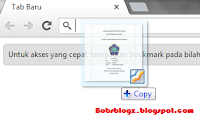
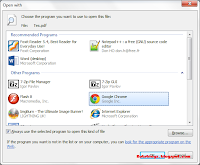
4. Maka akan tampil file .pdf pada program.
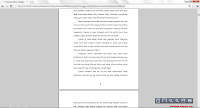
5. Lalu klik icon print pada program atau menekan tombol Ctrl + P.
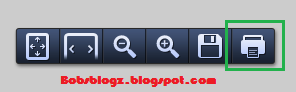
6. Maka akan tampilan file .pdf yang akan dicetak.
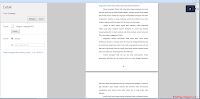
7. Blok tulisan yang akan disalin lalu klik kanan dan pilih salin / tekan Ctrl+C.
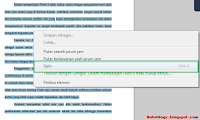
8. Paste-kan ke program pengolah kata atau semacamnya.
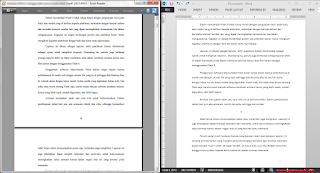
Tadaaaaa...... sekarang file tersebut sudah tersalin, tinggal tugas anda adalah memodifikasi terhadap tulisan tersebut agar tampak sama.
Kekurangan menggunakan teknik ini:
1. Tampilan tulisan tidak bisa diperbesar atau perkecil (zoom). Terutama bagi layar komputer yang kecil akan lebih menyulitkan.
2. Tidak bisa menyalin gambar.
Pesan : Gunakanlah trik tersebut secara bijak.
Tested on Google Chrome Version 23.0.1271.95
Semoga bermanfaat. :D
Available link for download
Tuesday, December 6, 2016
CamScanner Phone PDF Creator v4 1 0 20160822 UNLOCKED APK
CamScanner Phone PDF Creator v4 1 0 20160822 UNLOCKED APK

CamScanner
- Quickly Digitize Document
- Just use your phone camera to scan and digitize all kinds of paper documents: receipts, notes, invoices, whiteboard discussions, business cards, certificates, etc.
- Optimize Scan Quality
- Smart cropping and auto enhancing ensures the texts and graphics in scanned documents are clear and sharp with premium colors and resolutions.
- Extract Texts from Image
- OCR (optical character recognition) feature recognizes texts in document images and extract them from images for later searching, editing or sharing. (Paid app only)
- Share PDF/JPEG Files
- Easily share documents in PDF or JPEG format with friends via various ways: post on social media, send attachment or document download link through email.
- *AirPrint & Fax Documents
- Instantly print out any documents in CamScanner with nearby printer via AirPrint; directly select document and fax to over 30 countries from the app.
- Collaborate on Documents
- Want to get feedback on your documents? Invite friends or colleagues to collaborate on documents. They can view, comment and exchange ideas on documents in groups. (Registrants only)
- Advanced Document Editing
- Make annotations on documents with a full set of editing tools. Also adding customized watermarks are made available to mark your own documents.
- Quick Search
- When you have plenty of documents, you can use Tags to categorize and easily find them. In addition, OCR for Search helps you find texts inside image and notes. Just enter one keyword, you can quickly find the document you want. (Registrants only)
- Secure Important Documents
- If you want to protect confidential contents, you can set passcode for viewing important documents; also, while sending document download link, you can set password to protect others from seeing it.
- Sync across Platforms
- Sign up to sync documents on the go. Just sign in to any smartphone, tablet or computer (visithttp://www.camscannert.net) you own and you can view, edit and share any document. (Registrants only)
- Download the apk file.
- Install normally.
- Done !


Download & Links
CamScanner Phone PDF Creator v4.1.0.20160822 APK / Mirror (23.9 MB) –FULL Features Unlocked , NO License Key Needed
CamScanner Phone PDF Creator v4.1.0.20160822.rar / Mirror (20.1 MB) – Untouched + License Key
Available link for download
Tuesday, November 29, 2016
CamScanner Phone PDF Creator APK ANDROID
CamScanner Phone PDF Creator APK ANDROID

* Installed on over 60 million devices in over 200 countries and regions around the world
* Over 50,000 new registrations per day
* CamScanner, 50 Best Apps, 2013 Edition – TIME
* Top Developer – Google Play Store
* “The application employs its own image cropping and enhancing algorithm that leads to clearer images.” – Makeuseof.com
* “CamScanner may just be the best deal for scanning documents on your phone.” – CNET.com
CamScanner helps you scan, store, sync and collaborate on various contents across smartphones, iPads, tablets and computers.
Features:
*Quickly Digitize Document
Just use your phone camera to scan and digitize all kinds of paper documents: receipts, notes, invoices, whiteboard discussions, business cards, certificates, etc.
*Optimize Scan Quality
Smart cropping and auto enhancing ensures the texts and graphics in scanned documents are clear and sharp with premium colors and resolutions.
*Extract Texts from Image
OCR (optical character recognition) feature recognizes texts in document images and extract them from images for later searching, editing or sharing.
CamScanner -Phone PDF Creator APK [ ANDROID ]
*Share PDF/JPEG Files
Easily share documents in PDF or JPEG format with friends via various ways: post on social media, send attachment or document download link through email.
*AirPrint & Fax Documents
Instantly print out any documents in CamScanner with nearby printer via AirPrint; directly select document and fax to over 30 countries from the app.
*Collaborate on Documents
Want to get feedback on your documents? Invite friends or colleagues to collaborate on documents. They can view, comment and exchange ideas on documents in groups.
*Advanced Document Editing
Make annotations on documents with a full set of editing tools. Also adding customized watermarks are made available to mark your own documents.
*Quick Search
When you have plenty of documents, you can use Tags to categorize and easily find them. In addition, OCR for Search helps you find texts inside image and notes. Just enter one keyword, you can quickly find the document you want.
*Secure Important Documents
If you want to protect confidential contents, you can set passcode for viewing important documents; also, while sending document download link, you can set password to protect others from seeing it.
*Sync across Platforms
Sign up to sync documents on the go. Just sign in to any smartphone, tablet or computer (visit CamScanner website) you own and you can view, edit and share any document.
Premium Subscription Service:
-Get 10G cloud space for storing documents
-Add extra 40 collaborators
-Extract texts in images for later editing or sharing
-Documents link shared with password protection.
-Unlimited document annotations
-No default watermarks on PDF file generated
-No in-app ads
DOWNLOAD :
DOWNLOAD HERE ( MEDIAFIRE )
INSTRUCTIONS :
3 - Try To places " CamScanner?License?PDF Creator - 1.7.apk " & " CamScanner-3.2.0.20140408.apk " to your android device
4 -
Available link for download
Tuesday, November 8, 2016
CamScanner Phone PDF Creator v4 1 0 20160905 Cracked Unlocked APK Download Latest
CamScanner Phone PDF Creator v4 1 0 20160905 Cracked Unlocked APK Download Latest

* Over 50,000 new registrations per day
* CamScanner, 50 Best Apps, 2013 Edition – TIME
* Top Developer – Google Play Store
CamScanner helps you scan, store, sync and collaborate on various contents across smartphones, tablets and computers.
Features:
*Mobile Scanner
Use your phone camera to scan receipts, notes, invoices, whiteboard discussions, business cards, certificates, etc.
*Optimize Scan Quality
Smart cropping and auto enhancing make the texts and graphics look clear and sharp
*Quick Search
By entering any keyword, you’ll see a list of docs with the word in their titles, notes or images (Registrants only)
*Extract Texts from Image
OCR (optical character recognition) extracts texts inside single page for further editing or .txt sharing. (Licensed only)
*Share PDF/JPEG Files
Easily share docs in PDF or JPEG format with others via social media, email attachment or sending the doc link
*Print & Fax
Instantly print out docs in CamScanner with nearby printer; directly fax docs to over 30 countries right from the app
*Collaboration
Invite friends or colleagues to view and comment on your scans in a group. (Registrants only)
*Advanced Editing
Making annotations or adding customized watermark on docs are made available for you
*Secure Important Docs
Set passcode for viewing important docs; meanwhile, when sending doc link, you can set password to protect it
*Sync across Platforms
Sign up to sync documents on the go. Just sign in to any smartphone, tablet or computer (visit www.camscanner.com) you own and you can view, edit and share any document. (Registrants only)
Premium Subscription Features ($ 4.99/month or $49.99/year):
1. Edit OCR results and notes of the entire doc, exporting as .txt file
2. Create Doc Collage for multiple pages
3. Add 10G cloud space
4. Add 40 extra collaborators
5. Send doc link with password protection and expiration date
6. Auto upload docs to Box, Google Drive, Dropbox , Evernote and OneDrive
7. Batch download PDF files in web app (www.camscanner.com)
8. Every benefit registrants enjoys
9. Everything paid app offers
Please note the subscription is automatically renewed at the end of the period unless you choose to cancel the subscription.
CamScanner users scan and manage
* Bill, Invoice, Contract, Tax Roll, Business Card…
* Whiteboard, Memo, Script, Letter…
* Blackboard, Note, PPT, Book, Article…
* Credential, Certificate, Identity Documents…


Download Links:
CamScanner Phone PDF Creator v4.1.0.20160905 APK ( mirror 1 ) / Mediafire / Mirror 1
Old versions:
CamScanner Phone PDF Creator v4.0.0.20160516 APK ( mirror 1 )
Available link for download
Saturday, November 5, 2016
Cara Cepat Merubah Word ke PDF di Android
Cara Cepat Merubah Word ke PDF di Android
nihhh bro& sist cara efektif buat dapetin hati lawan jenis yang kalian sukaa... saya sendiri juga pengen cobaa karena lagi naksir cewek XD
Sebenarnya apa sih yang harus anda lakukan saat anda merasa tertarik dengan seorang wanita single ketika berada disebuah tempat? Apakah anda akan lari dan bersembunyi? Apakah anda hanya berdiri dan memikirkan hal yang tepat untuk diucapkan? Nyatanya banyak pria yang kehilangan kesempatan itu, yakni saat bertemu dengan wanita yang cukup membuatnya gemes.
Kebanyakan pria terjebak dengan terlalu banyak berpikir mengenai apa yang harus dikatakan. Mereka percaya bahwa ada satu kata ajaib yang mampu bekerja dengan baik dalam segala situasi. Para pria melatih diri dengan kata-kata yang tepat, dan berharap kata pembuka itu mampu membuat perempuan tertarik padanya. Namun sayangnya pendekatan jenis ini jarang berhasil karena situasi yang tidak relevan. Padahal untuk menarik perhatian seorang wanita adalah berbicara soal kepercayaan diri yang anda tunjukkan pada wanita tersebut.
Ada 10 cara efektif yang bisa anda lakukan untuk mendekati wanita single.
1. Cerdas Dalam Mengamati Situasi Lingkungan
Mulailah sebuah pembicaraan yang berkaitan langsung dengan situasi lingkungan. Misalnya anda melihat seorang wanita di Mall dan anda merasa tertarik padanya, maka perhatikanlah apa yang dia lakukan saat itu. Sebut saja dia memilih jenis T-Shirt, maka yang harus anda tanyakan adalah Jenis T-Shirt yang sedang trend baru-baru ini, atau segala hal yang berkaitan dengan T-Shirt.
2. Senyum Yang Tulus (Natural Smile)

3. Hilangkan Sikap Ragu-Ragu
Dekatilah wanita tersebut dengan rasa percaya diri, dan tunjukkan padanya bahwa anda adalah orang yang tahu apa yang dia inginkan walaupun hanya dalam 3 detik saja. Setelah itu anda bisa pergi meninggalkan dia dari tempat itu.
4. Bahasa Tubuh Yang Positif
Jika Anda mendekati wanita dengan membungkuk serta kepala tertunduk ke bawah, Anda sebenarnya mengirim informasi negatif tentang diri Anda, yang membuat Anda kalah sebelum perang. Cobalah berdiri tegak, dengan bahu belakang dan dada yang tegak, serta berjalanlah dengan santai dan tenang.
5. Tidak Terlalu Cepat
Jika anda berjalan terlalu cepat, Anda mungkin dapat memicu alarm internalnya. Santai bro…, pendekatan yang lepas (rileks tanpa beban mental) biasanya merupakan cara terbaik untuk membuatnya merasa nyaman dengan keberadaan anda.
6. Pertahankan Kontak Mata
Jangan pernah menjadi yang pertama memecahkan kontak mata dengannya. Jika Anda melakukannya, hal ini menandakan bahwa anda sedang mengirimkan pesan bahwa anda merasa tidak nyaman dan tenang dalam mendekatinya. Bila anda menggunakan kontak mata yang kuat, dia akan merasa lebih tertarik kepada anda. Untuk menguasai teknik ini, anda harus melatihnya, terutama tentang pandangan mata yang sejuk, dan hindari cara kontak mata yang terkesan serem atau galak.
7. Pendengar Yang Baik
Pastikan anda berhati-hati untuk memperhatikan apa yang dikatakannya. Wanita menyukai pria yang memberi perhatian pada rincian apa yang dikatakannya. Wanita lebih cepat kehilangan good mood-nya ketika anda bersikap seperti tidak memperhatikan detail kata-katanya.
8. Jangan Gelisah
Gelisah saat anda sedang melakukan interaksi dengannya sangat mengganggu dan menunjukkan bahwa anda merasa tidak nyaman. Sehingga si wanita juga merasa BeTe dan akan menutup komunikasinya. Perhatikanlah gerakan tubuh anda, jangan sampai terlihat kaku atau terlihat gelisah, atur frekwensi ucapan-ucapan anda, jangan sampai terlihat gugup dan blepotan.
9. Meringankan Nada Suara
Nada suara anda adalah alat yang sangat powerfull untuk menggaet wanita. Mendekati dia dengan nada ringan dan ritme suara yang teratur adalah salah satu cara terbaik untuk memulai interaksi.
10. Menghormati Batas Kenyamanannya
Jika seorang pria yang sedang mendekatinya terlalu serius bisa membuat wanita merasa risih. Pendekatan yang lebih baik adalah dengan membicarakan hal-hal yang ringan, sedikit bercanda dan jangan mencampuri urusan pribadinya. Anda harus menghormati ruangnya, batas-batasnya, dan usahkan dia merasa nyaman dengan diri sendiri.
Available link for download